How to check what AI says about your winery
Ask the assistants about your own wines, sort the answers, and fix the retailer listings they read.


To check what AI says about your winery, ask ChatGPT, Gemini and Perplexity six plain questions about your own brand, label each answer as accurate, partly accurate, wrong, outdated or no answer, and trace every wrong or outdated answer to the page it came from. Many of those pages are not yours: they are retailer, distributor and marketplace listings, and the fix is to correct them against one current, approved set of product images and facts.
A buyer who already knows your name asks the assistant about you directly. What comes back is assembled from whatever the engine can read, and a back label from 2021 on a retailer page reads just as well as this year's.
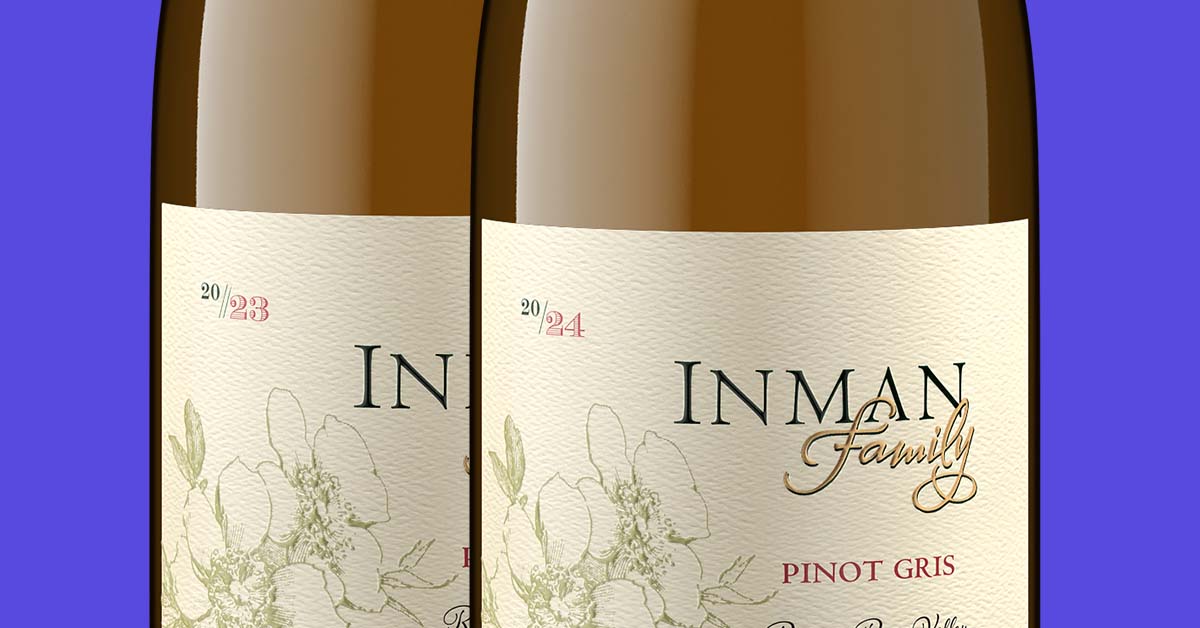
The wine changed. The label changed. The picture on the retailer's page did not, and that page is what the answer was built from.
Why AI answers about your winery go wrong
AI answers go wrong about a brand mostly because they read stale pages, not because they invent facts. In a study by the search agency Seer Interactive of 1,562 branded prompts across six AI platforms, the engines were right 95.9% of the time when they answered, and declined to answer 31.2% of the time.
Seer traced its errors to three causes: facts learned in a model's training data, stale sources the engine reads live, and the brand's own pages read the wrong way. The stale sources are the ones you can fix quickly, because each one is a page someone can edit.
That study measured one marketing agency, not a winery. The pattern still fits wine, where a single label can sit on a dozen retailer, distributor and marketplace pages you never built.
The third-party pages AI reads about your wine
AI answers draw on retailer listings, distributor catalogs, marketplaces, wine apps and trade portals, not just your own site. Each one holds its own copy of your bottle shot, vintage, price and tasting notes, uploaded once and rarely revisited.
Marketers outside wine see the same risk. In the Typeface Signal Report: The AI Visibility Gap, a survey of 500+ US and UK marketing leaders, 25% named negative opinions and third-party content as their biggest risk in AI answers, and only 42% are actively keeping their brand consistent across the third-party content AI draws from.
Webflow and HubSpot sum up the mechanism in their AEO playbook for marketing teams: “AI rewards consensus.” When the vintage, price or bottle shot differs from one page to the next, the engine picks one version or fills the gap itself.
Wine starts from a harder place. The State of Wine Product Imagery 2026 found that 74% of wine storefronts carry product images in mismatched proportions. A catalog that looks fine on its own site can still fall apart the first time its files are used anywhere else.
Six questions to ask AI about your winery
Ask each assistant the same six questions about your own brand, by name, in a fresh chat. Use a logged-out or private window where you can, because answers shift with chat history and from one run to the next.
- What you make: “What wines does [your winery] make?”
- Current release: “What is the current vintage of [your wine], and what does it cost?”
- Where to buy: “Where can I buy [your wine]?”
- Availability: “Is [your wine] still available?”
- The bottle: “What does the [your wine] bottle look like?”
- Comparison: “How does [your winery] compare with [a neighboring winery]?”
Run each question two or three times on each engine. One wrong answer once is noise. The same wrong answer every time points to a source.
How to label each AI answer
Sort every answer into one of five labels, and write down the exact claim behind it.
- Accurate: Every fact matches what you sell today.
- Partly accurate: The right winery, with one detail off, such as the price or the appellation.
- Wrong: A fact that was never true, such as a wine you have never made.
- Outdated: Something that used to be true, such as last year's vintage, a retired label, an old price or a sold-out wine shown as available.
- No answer: The engine declines, or sends the buyer to your website.
Outdated is the label to watch. It almost always points to a page that was right once and was never updated.
A no answer is a result, not a failed run. In Seer's study the engines declined 80.3% of comparison prompts, so silence on your neighbor question is normal and needs no fix.
Note whether each answer names its sources. A cited page can be corrected, while an answer with no source usually comes from training data and changes only when the model is updated.

How to trace a wrong answer to its source
Open every page the answer cites and find the fact it repeated. For an outdated vintage or a retired label, the source is usually a listing that still carries the old bottle shot and the old copy.
Then check the listings the answer did not cite but buyers will still see: your top retailers, your distributor's catalog and the marketplaces that carry you. If the same old image shows up in three places, it came from one old file that was sent around.
Watch for one bottle shot reused across vintages. The State of Wine Product Imagery 2026 found that about one wine listing in eleven on wineries' own stores shows a photograph of a different vintage from the one in the product title, among the listings where this could be checked. If it shows a different vintage from the one in the title, the page is describing two wines at once, and an answer can repeat either one.
The winery agency Highway 29 Creative puts the first audit question plainly in its post on the hidden costs of DIY winery photography: “Do the product images on your website reflect your current vintages and labels?” Ask it of every retailer page too.
Do the check on a phone as well as a laptop. Open your top five wines on your own site and on each retailer that carries them, and compare the vintage on the label in the photo with the vintage in the title.
Retail listings are also what shopping assistants read when a buyer is ready to order. What AI shopping agents read in a wine listing covers that side: the feed, the page details and the image field.
How to fix outdated third-party listings
Fix third-party listings by sending every retailer and distributor the same current image files and the same fact sheet, and asking each one to replace what it has. A correction gets acted on when it is specific: the page, the wrong detail and the replacement file, in one email.
Start with your own website, then the pages the AI answers cited, then the listings with the most traffic. Seer found its own site was the single most-cited source about its brand, so an error there spreads furthest.
Ask the same six questions again a few weeks later. Seer estimates that a fix to a stale source an engine reads live shows up in its answers within days to weeks, while a fact learned in training can take months.
One approved image set for every listing
An audit only holds if every listing draws from one current, approved set of product images. When each new vintage gets its own bottle shot and that file replaces the old one everywhere, there is nothing stale left for an answer to repeat.
Outshinery Studio builds each wine as a 3D model from your label files, made by trained artists, with no physical bottle needed. When only the vintage changes, the update is free, so the current year can go to every retailer on release day instead of trailing a season behind.
Frequently asked questions
How do I see what ChatGPT says about my winery?
Open a fresh chat and ask about your winery by name: what it makes, its current vintage and price, and where to buy it. Run each question more than once and compare the answers with what you sell today.
Why does AI show an old vintage of my wine?
AI answers repeat what they find on the pages they read, and many retailer and marketplace listings still carry last year's vintage, label and price. Update those listings with current images and facts, and answers that read those pages live can follow within days to weeks.
How often should a winery check AI answers?
Check at every new release and at least once a quarter. A new vintage is the moment old listings go stale, so run the questions again once the new files have gone out.
Can I change what ChatGPT says about my winery?
Not directly. You cannot edit an AI answer, only the pages it reads, so the fixes happen on your website and on the retailer, distributor and marketplace listings that carry your wines.
Do AI shopping answers show my bottle images?
Shopping answers that show products pull their images from retailer listings and product feeds. Whatever bottle shot sits on those pages is the one a buyer sees next to the answer.

The AI answer audit checklist
- Questions: The same six questions, asked by name on ChatGPT, Gemini and Perplexity
- Runs: Two or three runs per question on each engine, each in a fresh chat
- Labels: Accurate, partly accurate, wrong, outdated or no answer, with the exact claim noted
- Sources: Every cited page opened and the repeated fact found
- Listings: Top five wines checked on a phone, on your site and every retailer, label vintage against title vintage
- Fix file: One approved image set and fact sheet attached to every correction
- Recheck: The six questions asked again a few weeks after the fixes
An hour of checking shows you which page a buyer's answer really comes from.